Fizen Update: You Can Now Pay for an eSIM With a Card, Apple Pay or Google Pay
You no longer need crypto to buy a Fizen eSIM. The Confirm payment screen now offers card, Apple Pay and Google Pay next to USDT, and one of those options solves a problem the others cannot.
What changed
- The eSIM checkout screen now offers two payment routes side by side: USDT from your Fizen wallet, or card, Apple Pay and Google Pay.
- Cards and wallets open Stripe's secure checkout, so it is the same flow you have used on any other site.
- You no longer need to hold, buy or understand crypto to get a Fizen eSIM.
- Apple Pay and Google Pay matter more than convenience abroad: they authenticate on your device instead of sending a bank code to a phone number you may not be able to receive on.
- Your eSIM credit is applied before you choose a method, so the discount shows in Payment details either way.
- Plans start across 150+ countries, and Fizen does not add a foreign exchange markup of its own.
Short version: the eSIM checkout has changed. Where it previously assumed you were paying from a stablecoin balance, the Confirm payment screen now puts two routes next to each other, and the second one is a normal card checkout.
Where to choose it at checkout
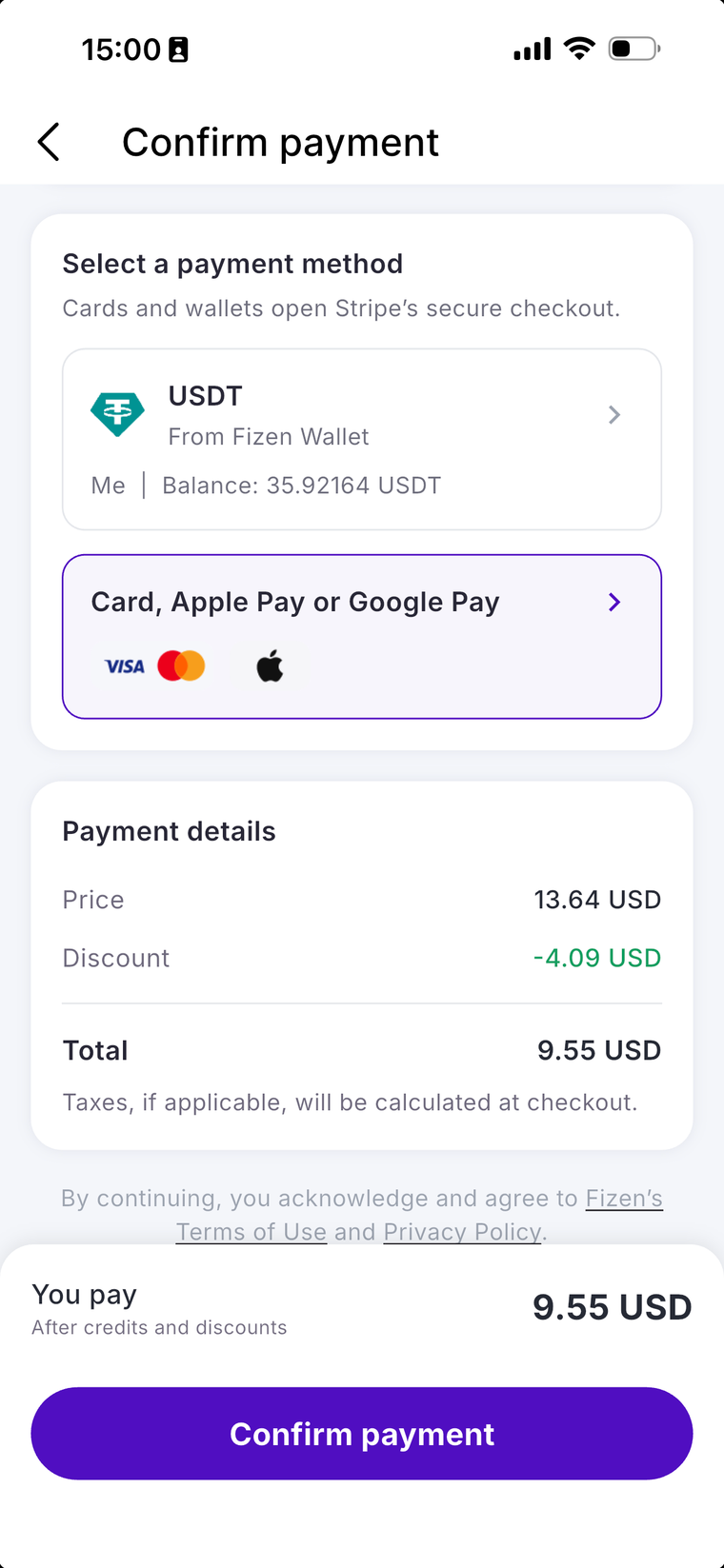
Open the eSIM tab, pick your country and plan, then continue to Confirm payment. The screen looks like this.
Reading the screen, top to bottom
- Select a payment method. Two options. The note underneath tells you what happens next: cards and wallets open Stripe's secure checkout.
- USDT, from Fizen Wallet. Shows the account and your current balance, so you know before tapping whether it covers the purchase.
- Card, Apple Pay or Google Pay. Marked with the Visa, Mastercard and Apple logos. Tap it and Stripe's checkout opens, where Apple Pay or Google Pay appears if your device supports it.
- Payment details. Price, then Discount in green, then Total. Taxes, if applicable, are calculated at checkout.
- You pay. The bottom bar repeats the final figure after credits and discounts, so the number you tap Confirm on is the number you are charged.
A useful detail: the discount is applied before you choose how to pay, not after. In the example above a $13.64 plan shows a $4.09 discount for a $9.55 total, which is the credit doing its work. Switching between USDT and card does not change that figure.
Why this update matters more than it sounds
The obvious reading is that Fizen removed a barrier for people who do not hold crypto, which is true and slightly boring. The more interesting effect is on when you can buy.
An eSIM often gets bought at the worst possible moment: you have landed, your home SIM is off or out of range, the airport Wi-Fi is doing what airport Wi-Fi does, and you need data now. If your bank verifies the card payment with a one-time code by SMS, that code goes to a number you currently cannot receive on. The purchase fails, and the thing that would fix it is the thing you were trying to buy.
Apple Pay and Google Pay do not have that failure mode. They authenticate on the device with your face or fingerprint, with nothing sent anywhere else. That is the real argument for setting one of them up before you fly, and it applies whichever eSIM provider you use.
The four ways to pay, compared
| Method | How it runs | Best for | Worth knowing |
|---|---|---|---|
| Credit or debit card | Stripe checkout | Anyone with a normal bank card | May trigger your bank's 3-D Secure step |
| Apple Pay | On-device, Face ID or Touch ID | iPhone users, especially mid-trip | No card number typed, no code to wait for |
| Google Pay | On-device authentication | Android users | Same benefit as Apple Pay |
| USDT | From your Fizen wallet balance | People already holding stablecoins | Balance is shown on screen before you tap |
Which cards actually work, and which do not
Card payments run through Stripe, so Stripe's rules decide what can be charged, not Fizen. Two categories fail no matter how much balance is on the card.
| Payment method | Works for the eSIM checkout? | Why |
|---|---|---|
| Visa or Mastercard issued outside sanctioned jurisdictions | Yes | Normal Stripe checkout, your bank may add a 3-D Secure step |
| Apple Pay or Google Pay | Yes, if the card behind it is eligible | The wallet is just a wrapper around the same card |
| Mir cards | No | Stripe states it does not support the Mir payment system |
| Visa or Mastercard issued by Russian banks | Unlikely to work | Stripe says the card networks no longer serve Russian financial institutions, so these transactions are unlikely to succeed |
| Cards from sanctioned Russian or Belarusian institutions | No | Stripe does not process transactions involving sanctioned institutions |
| USDT from your Fizen balance | Yes | Settles onchain on Solana or BNB Chain, no bank or card network involved |
Those card limits come from Stripe's own sanctions page, which also notes that Stripe does not support users located in Russia, Ukraine and Belarus. The rules change over time, so check that page if your situation is borderline.
What to use instead if your card is declined
- Pay from your USDT balance. This is the route that does not depend on a card network at all, and it is why many readers in affected countries use it. Top up the balance, then choose USDT at checkout.
- Use a card issued in another country if you legitimately hold one, for example an account opened while living or studying abroad.
- Check the wallet, not just the phone. Apple Pay and Google Pay pass the underlying card to Stripe, so a card that fails on its own also fails inside the wallet.
- Do not buy a card from a reseller that promises to bypass sanctions screening. Those accounts get frozen, and the money usually goes with them.
What it costs
Plans start from $4 and cover 150+ countries, in both fixed-data forms (daily 1GB, 3GB, 5GB) and unlimited plans. On like-for-like fixed-data plans, prices are typically below Airalo, Saily, Holafly and Nomad, though the honest comparison depends on the country and duration you are buying.
On fees, the split is worth stating plainly. Fizen does not add a foreign exchange markup of its own. What your card issuer charges is between you and your bank, and a card that adds a foreign transaction fee will add it here as it does everywhere else. Paying from a USDT balance takes your bank out of the transaction entirely, which is the one genuine cost difference between the two routes.
Your credits still work the same way
New accounts get a $10 welcome credit. It is added automatically the first time you open the eSIM tab in the Fizen app, with no code to type.
Credit covers up to 30% of a plan's price per purchase, or your remaining balance if that is smaller, which is exactly what the Discount line on the screen above is showing. It is valid for 12 months, and each new credit you earn resets the expiry on your whole balance. Full rules on the welcome credit page.
Before you pay: the five-second device check
- eSIM capable and carrier unlocked. Both are required. Some region-specific handset models ship with eSIM disabled even though the hardware supports it.
- eSIM is data only. Keep your normal SIM in the phone for calls and bank one-time passcodes, which is the same reason the wallet payment methods are useful.
- Install before you fly, on home Wi-Fi. Installing is not activating, and doing it early costs nothing.
- Travelling to mainland China? Set the eSIM up completely before you land, because the activation page is not reachable from inside the country.
- Need hotspot? Most plans allow tethering, but it varies by plan, so check Package details before buying.
If something goes wrong
The warranty runs for the whole length of the trip, not just day one, and a replacement is free. In practice most "not working" reports turn out to be a settings step, so support runs a short checklist with you first: install completed, data roaming on, line switched on, correct line labelled. For a genuine fault you get a free replacement or a refund, with the method confirmed based on how you paid.
Have your Order ID, the ICCID from My eSIMs, your device model and a screenshot ready and it moves faster. And if the trip does not happen at all, an eSIM you never activated can be handed back; refund eligibility depends on the plan, so check Package details or ask in chat.
One thing that is still true
Most Fizen eSIMs do not top up. If you run out of data you install a new eSIM, which is one tap rather than a support ticket, but it is not a recharge of the existing one. Worth planning your data before the trip rather than assuming you can extend mid-way. If you are unsure, we did the arithmetic in how much eSIM data you actually need.
Frequently asked questions
Can I buy a Fizen eSIM with a credit card?
Yes. On the Confirm payment screen, choose "Card, Apple Pay or Google Pay" instead of USDT. Cards and wallets open Stripe's secure checkout, so it is the standard card form you have used elsewhere.
Where do I choose the payment method in the Fizen app?
Open the eSIM tab, pick your country and plan, then continue to the Confirm payment screen. "Select a payment method" sits at the top with two options: USDT from your Fizen wallet, or Card, Apple Pay or Google Pay.
Can I pay for an eSIM with Apple Pay?
Yes. Choose the card option on the Confirm payment screen and Apple Pay appears in Stripe's checkout if your device supports it. It is the method worth setting up before travelling, since it authenticates with Face ID or Touch ID rather than a code sent by SMS.
Does Fizen eSIM accept Google Pay?
Yes, through the same card and wallet option at checkout, with the same on-device authentication benefit as Apple Pay.
Do I still need crypto to buy a Fizen eSIM?
No. USDT from your Fizen wallet is one option, not a requirement. Card, Apple Pay and Google Pay all work.
Does paying by card cost more than paying with USDT?
Fizen does not add a foreign exchange markup on either route, and the discount is applied before you choose a method, so the Total is the same. The difference is your card issuer: a card with a foreign transaction fee will apply it, while paying from a USDT balance keeps your bank out of the transaction.
Why did my card payment fail while I was abroad?
Usually the bank's verification step. If it sends a one-time code by SMS to your home number and that SIM is off or out of range, you cannot complete the payment. Apple Pay or Google Pay avoids this because it authenticates on the device.
Can I pay with a Russian card, or with Mir?
Card payments go through Stripe. Stripe states that it does not support the Mir payment system, that it does not process transactions involving sanctioned Russian and Belarusian institutions, and that transactions with Russian-issued cards are unlikely to succeed. If that is your situation, pay from your USDT balance instead: it settles onchain and does not touch a card network.
Is my eSIM credit applied before or after I choose how to pay?
Before. The Discount line in Payment details already reflects your credit, and the bottom bar shows what you pay after credits and discounts. Switching between USDT and card does not change that total.
How much does a Fizen eSIM cost?
Plans start across 150+ countries, with both fixed-data plans (daily 1GB, 3GB or 5GB) and unlimited options. On like-for-like fixed-data plans prices are typically below Airalo, Saily, Holafly and Nomad, depending on country and duration.
Can I top up a Fizen eSIM when the data runs out?
Most Fizen eSIMs do not support top-up. Buying more data means installing a new eSIM, which is one tap, but it is not a recharge of the existing one.
Card, Apple Pay, Google Pay or USDT. Your choice.
Travel eSIM in 150+ countries, installed in one tap on supported iPhones. Pay however suits you, and new accounts get a $10 welcome credit in the app's eSIM tab. Not offered to US Persons.
Terms and conditions
- Information only. This article is provided for general information. It is not financial, legal, tax or investment advice, and nothing here is a recommendation to buy, sell or hold any asset.
- For readers in the United States. This article provides information only. It is not an offer, solicitation or sale of any product or service, and it is not financial, investment, legal or tax advice. Fizen is not offered to US Persons.
- Screens and features change. The screenshot shows the app at the time of writing. Layout, wording and available payment methods can change, and the app itself is the authority on what it currently offers.
- Prices and plans. Plan availability, pricing, validity, hotspot support and refund eligibility vary by country and plan and change without notice. Check Package details in the app before buying.
- Payments. Card and wallet payments are processed by Stripe. Your card issuer sets its own exchange rate, any foreign transaction fee and its verification rules, all of which are outside Fizen's control. On-chain transfers are irreversible once confirmed.
- Credit is a discount, not money. eSIM credit is a promotional discount applied to eSIM purchases in the app. It cannot be withdrawn, transferred, or exchanged for crypto or fiat. Full rules at docs.fizen.io.
- Devices. Your phone must be eSIM capable and carrier unlocked. eSIM is data only, so keep your normal SIM for calls and one-time passcodes.
- Availability. Fizen is not offered to US Persons. Product availability varies by country and can change without notice.
- Full terms. Master Terms of Use, Privacy Policy and Disclaimer on the Fizen site.
Details as of 4 September 2026, based on the Fizen app at the time of writing. Welcome credit rules: docs.fizen.io. Plan details, taxes and refund eligibility are shown in the app at the point of purchase and take precedence over this article.